


Cleaner Guard
4.21.00K Reviews
App Specs
- Version
- 1.1.3
- Updated On
- License
- Free
- Downloads
- 1,000,000+
- Developer
- Sanfro Workteam
- Categories
- Tools
- Platform
- Android
Screenshots
 Analysis by AppCompare
I tend to be careful with phone-cleaning apps: a tidy dashboard can make an app feel reassuring, but trust depends on what it asks to do and whether its actions are clear. Cleaner Guard is a free Android tools app from Sanfro Workteam, and its appeal is straightforward: it brings cleanup and device-management tasks into one place. I’d approach it as a utility to inspect and use selectively, not as a reason to hand over permissions without thinking.
Why a cleaning tool deserves a closer look
Apps that promise to tidy a device can touch areas people care about, such as stored files, installed apps, and notifications. That makes the difference between a useful shortcut and an uncomfortable surprise depend on the choices shown while using the app. I would read each permission prompt in context, check what a requested access enables, and decline anything that does not seem necessary for the task I want to perform.
That caution is not a claim that Cleaner Guard does anything improper. It is simply a sensible habit for any utility that works with device content. A cleaner can identify files or apps, but the person using it should remain the one deciding what gets removed. I would avoid treating a scan result as an instruction: review the items first, especially when freeing space is less important than keeping a download, document, or app’s stored data.
Use visible choices, not assumptions
When trying a tool like this, I look for clear labels before tapping a cleanup or optimization control. If the screen offers a list of items, I would inspect it rather than selecting everything automatically. If Android asks for access, I would pause long enough to understand the request and use the phone’s settings later to review or change app permissions. Those steps are more reliable than assuming a cleaner needs broad access just because it is a cleaner.
The app’s simple positioning makes it approachable for someone who wants a single place to review device clutter. It is available for Android devices running version 6.0 or later, and it is rated for Everyone. Its current version is 1.1.1. Those details make it easy to judge basic compatibility, but they do not replace checking the actual prompts and controls on your own device.
Getting Started with Cleaner Guard
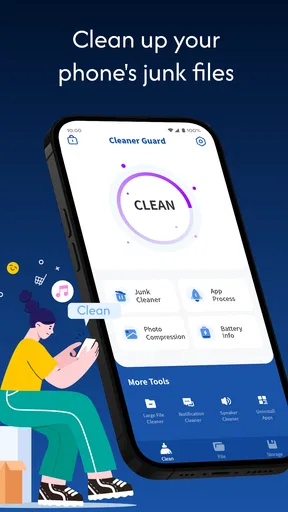
The first thing you’ll notice about Cleaner Guard is its sleek and user-friendly interface. As soon as you open the app, you're greeted with a clean dashboard that makes navigation a breeze. No need to be a tech wizard to figure out where everything is. I mean, who has the time to read a manual these days, right?
The app is designed to optimize your phone’s performance by cleaning out junk files, managing apps, and even boosting your device’s memory. Sounds promising, doesn’t it? Let’s dive into the nitty-gritty of what it offers.
Worth Reading Before You Choose

EA SPORTS FC Mobile 26 Is a Bigger Football Game, but It Takes Time

Flipboard Shows What News Apps Must Do Beyond the Feed

Switching to Android Auto Means Rethinking Your Driving Routine

Google Calendar Makes a Crowded Week Easier to Manage

Ludo King Makes the Most of the Minutes Between Plans

Baby Panda World Brings Quick Play to Modern Phones, but Its Game Library Feels Busy
Features That Stand Out
One of the standout features is its junk file cleaner. It’s amazing how much digital clutter can accumulate over time. With just a tap, Cleaner Guard scans your device and identifies all those unnecessary files hogging up space. It's like having a virtual broom sweeping through your phone.
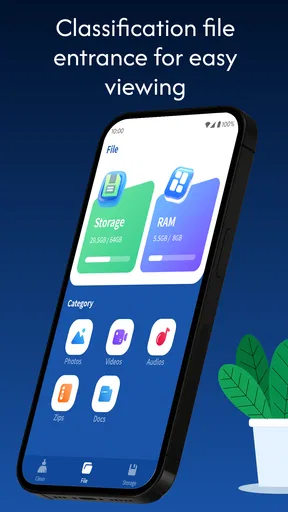
Then there’s the memory booster. If you’re like me and have way too many apps open at once, this feature is a lifesaver. It optimizes RAM usage, making sure your phone doesn’t slow down when you need it the most. It’s like giving your phone a shot of espresso to keep it running smoothly.
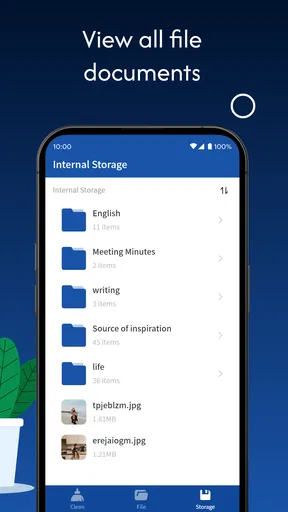
Cleaner Guard also offers an app manager. This nifty tool helps you keep track of all installed apps, making it easy to uninstall the ones you no longer use. Trust me, you’ll be surprised at how many apps are just sitting there, gathering digital dust.
Using Cleaner Guard Daily
Now, using Cleaner Guard isn’t just a one-time thing. It’s like brushing your teeth – a regular habit. I’ve integrated it into my daily routine, and my phone has never felt lighter. Plus, with notifications reminding you to clean up, it’s hard to forget. It’s like having a personal assistant, but without the hefty salary.
And speaking of reminders, let’s talk about the notification cleaner. It organizes notifications so you aren’t bombarded with alerts every five seconds. It’s a small feature, but oh-so-satisfying.
Practical routines—and when I’d skip a cleanup
I get the most value from a cleaner when I have a specific reason to open it, rather than running every option on a schedule. For example, after a weekend of saving maps, photos, and files for a trip, I might use the junk-file scan to see whether there is clutter worth reviewing. I would then leave personal downloads alone unless I could identify them. That small pause is useful: a file that looks disposable by name may be something I still need.
For an app manager, I’d use a short “keep, remove, decide later” check rather than uninstalling everything I have not opened recently. A rarely used banking, travel, or work app may still be important when a particular situation comes up. Before removing anything, I’d check whether I know the sign-in details and whether the app stores information I might want. This is a practical way to make cleanup intentional instead of turning a quick tidy-up into a recovery task.
There is also a useful trade-off in the memory-boosting approach. Closing or clearing processes can make a screen look tidier, but it is not automatically the same as making a phone feel faster for the rest of the day. If I notice lag, I would first close an app that is genuinely stuck or restart the phone if needed, then use a booster only when I have a clear reason. I would not keep tapping it every few minutes; frequent intervention can become busywork, and the phone’s own system may manage background activity better for ordinary use.
Notifications need a personal touch
Notification cleanup is most helpful when it reduces noise without hiding something I rely on. I would treat the feature as a way to organize what I see, not as a blanket reason to silence alerts. A sensible routine is to identify which notifications are merely distracting and which ones carry time-sensitive information, then adjust only the former. If the app’s controls do not make the effect clear, I would leave important alerts untouched and manage them through Android’s notification settings instead.
This is one place where a built-in Android control may be the better choice. System settings are often the more direct route when I want to change notification behavior or inspect permissions, because they are already part of managing the phone. Cleaner Guard is more appealing when I want its cleanup and app-management tasks gathered in one interface. I see those approaches as complements rather than assuming a third-party utility must replace the phone’s own tools.
What a normal day with it might look like
Imagine I am about to record a long event and discover that storage is tight. I would open the cleaner, review the scan, and look for clearly disposable clutter before making a change. Then I might check the app list for something I knowingly no longer need, rather than removing unfamiliar items just to make the number look better. Afterward, I would confirm that the camera and the apps I need still work. The important point is to use the app as a prompt for a deliberate review, not as an automatic fix for every storage problem.
If the phone is slow but storage is not the issue, I would be more cautious about expecting a cleanup to solve it. A sluggish device can have several causes, and a memory tool cannot make an older phone behave like a newer one. I would try the specific task that matches what I am seeing, then stop if there is no meaningful improvement. That keeps expectations realistic and avoids turning a utility into another app I feel obliged to run.
Who will find it useful
I can see this fitting people who prefer a guided, visual place to review junk files, installed apps, and notification clutter instead of hunting through several settings screens. It may also suit someone who is comfortable making the final call after a scan but appreciates having likely cleanup targets surfaced. The app has an average rating of 4.3 from around 5.9 thousand ratings, and it has been installed over a million times. That gives a prospective user some evidence of broad interest, though I would still judge it by how clearly it behaves on my own phone.
I would skip it if I rarely run short of space, already know how to manage storage in Android settings, or dislike tools that send reminders. It is also not the right choice for anyone who expects one tap to fix every cause of slow performance. If all I need is to uninstall a single app or adjust one notification, going straight to the relevant system setting is simpler and avoids adding another utility to maintain.
Performance and Reliability
Performance-wise, Cleaner Guard is a champ. It runs smoothly without any hiccups. You don’t have to worry about the app crashing or freezing, which is something I can’t say for every app out there. It’s reliable, and that’s a huge plus in my book.
But what about battery life, you ask? Well, Cleaner Guard is pretty efficient. I didn’t notice any significant battery drain, which is a relief because nobody wants an app that drains your battery faster than a teenager texting.
Questions I would settle before relying on it
Would I let it delete items without looking? No. I would review what is selected and keep anything whose purpose I do not recognize. Can it replace Android’s own controls? I would not treat it as a substitute for system settings, particularly for permissions and notification decisions. Is it useful on an older compatible phone? It can be considered on devices running Android 6.0 or later, but compatibility alone does not promise a noticeable speed change; I would test one task at a time and keep the outcome in perspective.
Would I run it every day? Only if the reminders and the condition of my phone made that worthwhile. A weekly or occasional check may be a calmer fit for someone who does not create much clutter, while a person who frequently downloads large files may have reason to review storage more often. I would choose a rhythm based on actual need rather than treating repeated cleaning as proof that the phone is being cared for.
My Final Thoughts
In conclusion, if you’re looking to give your phone a little TLC, Cleaner Guard is worth downloading. It’s easy to use, effective, and doesn’t require a degree in rocket science to operate. Whether you’re tech-savvy or just someone who wants their phone to run better, this app has something for everyone.
So, next time your phone feels sluggish, remember there’s a simple solution out there. Give Cleaner Guard a try and see the difference it makes. Who knows, you might just become a fan like me!
A cautious recommendation
My recommendation is measured: I would try it if I wanted a single, approachable place to review clutter and installed apps, and I would keep each cleanup decision in my hands. Its free price lowers the barrier to testing it, while its Everyone age rating makes it suitable for a broad audience. I would still pay attention to the permissions it requests and the choices shown on screen, especially before removing files or changing how notifications are handled.
Pros
- User-friendly interface for easy navigation.
- Effective in freeing up device storage.
- Boosts device performance noticeably.
- Includes privacy protection features.
- Customizable cleaning schedules.
Cons
- May display occasional ads.
- Limited features in free version.
- Requires regular updates for efficiency.
- Some tools may overlap with built-in features.
- Can drain battery if used frequently.
FAQs for Cleaner Guard
What is Cleaner Guard, and how does it work?
Cleaner Guard is a mobile application designed to optimize your device’s performance by cleaning junk files, managing apps, and boosting RAM. It scans your device for unnecessary files and cache, allowing you to free up storage space. Additionally, it offers features to enhance battery life and improve overall system speed.
Is Cleaner Guard safe to use on my device?
Yes, Cleaner Guard is safe to use. It employs secure algorithms to ensure that only unnecessary files are identified and removed. The app does not access or delete personal files such as photos, documents, or contacts. Always download from official app stores to avoid counterfeit versions.
Does Cleaner Guard require a subscription or in-app purchases?
Cleaner Guard is free to download and use. However, it offers in-app purchases for advanced features like deep cleaning, advanced battery management, and ad removal. Users can enjoy basic functionalities without any cost but may consider premium features for enhanced performance.
Can Cleaner Guard improve my device’s battery life?
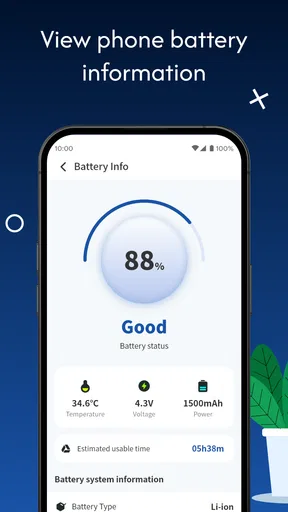
Yes, Cleaner Guard includes features specifically designed to extend battery life. It monitors power-hungry apps and processes, allowing you to manage or close them. Additionally, it optimizes device settings to ensure efficient battery use, helping your device last longer between charges.
Will Cleaner Guard delete any important files from my device?
No, Cleaner Guard is designed to avoid deleting important files. It specifically targets temporary files, cache, and unused app data that do not affect your essential data. Nonetheless, you can review the files before deletion to ensure nothing important is removed.


